
Install · Your Phone & Tablet
Take Poievia™ Everywhere.
Turn the studio into a one-tap app on your home screen — it takes under a minute, and your books, drafts, and Story Bible stay perfectly in sync between your phone and computer.
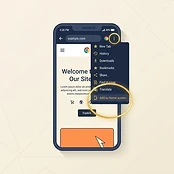
Step 1
Open Poievia™ In Chrome
Open the Poievia™ website in the Chrome app, then tap the three dots in the very top-right corner of the screen — circled in gold in the picture.
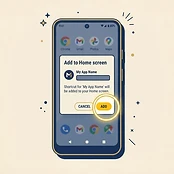
Step 2
Tap 'Add To Home Screen'
In the menu that opens, tap 'Add to Home screen' (some phones call it 'Install app'), then confirm by tapping 'Add' or 'Install' — highlighted in gold in the picture.
Step 3
You're Done
The Poievia™ icon now sits on your home screen next to your other apps — one tap and you're writing.
Already installed? Just tap the Poievia™ icon on your home screen anytime — everything you write on one device is waiting on the other.